Webroot Filtering Extension

  • April 2, 2014
  • 7 replies
  • 54 views

Forum|alt.badge.img+21
Hello,
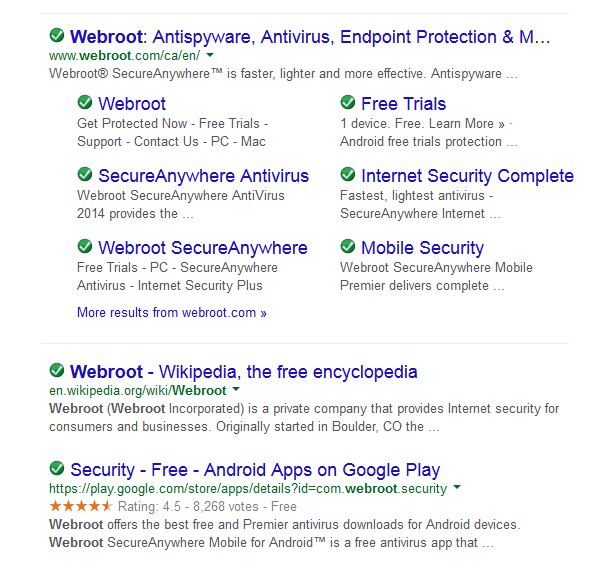
When I use my search engine the listed results are all displaying the webroot filtering extension icon for dangerous websites. Non of the seaches are showing the usual green safe icon. Is there a problem with the Webroot filtering extension add on. I have tried using both google chrome and internet explorer and on the other computers I own, all with the same result. Please advise.
Stephen

7 replies

Miquell
Community Leader
  • Community Leader
  • April 2, 2014
Hi Stephen! :D
 
The Support already knows about it and I guess they're working on it.
Please be patient, I'm sure that soon it will be working as good as always :D
 
Regards,
 
Mike

shorTcircuiT
Gold VIP
I am aware of a problem with occasional False Positives, but not of this.  I could very well have missed threads on this over the last couple weeks... but search results are working correctly for me.
 
Please submit a Trouble Ticket.  Even if Support is fully aware of the issue, additional examples may help them get this resolved for you quicker.

Miquell
Community Leader
  • Community Leader
  • April 2, 2014
@DavidP1970 wrote:
I am aware of a problem with occasional False Positives, but not of this.  I could very well have missed threads on this over the last couple weeks... but search results are working correctly for me.
 
Hi David,
 
Look at PM ;)
 
Mike

RetiredTripleHelix
Gold VIP
Forum|alt.badge.img+56
They work fine for me as well!
 
Daniel


Miquell
Community Leader
  • Community Leader
  • April 2, 2014
Oh.., it seems that this issue affects only some of the users.
Stephen, in this case you should definitely submit a Trouble Ticket, just as David has suggested you earlier.

 
Mike

Forum|alt.badge.img+21
  • Author
  • Community Leader
  • April 2, 2014
Hi Mike,
I did also get some false positives when it was working. I have submitted a ticket as requested.
Many thanks
Stephen

Forum|alt.badge.img+21
  • Author
  • Community Leader
  • April 10, 2014
Support where aware of the problem and said it only affected some users. It is now working again.
Many thanks
Stephen