Answer

Webroot icon not showin in action center

  • September 26, 2014
  • 13 replies
  • 91 views

garlicwebroot
Popular Voice
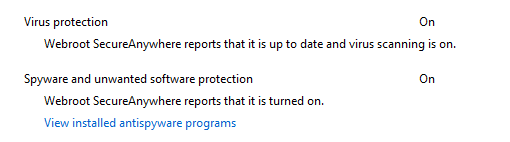
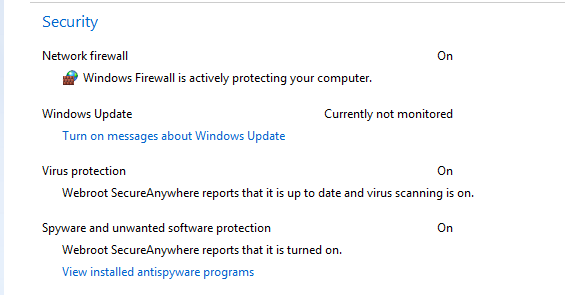
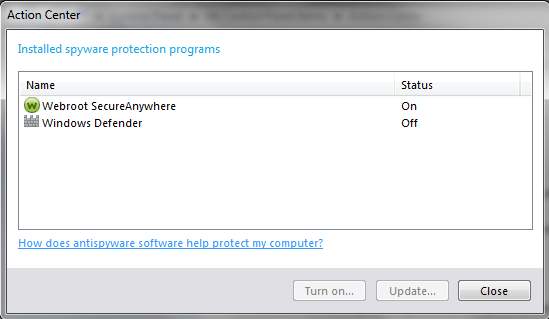
Hello. Was a solution for this issue ever discovered? Action Center does not show Webroot icon, it does however report Webroot is protecting my system. Thanks for your help with this matter. 😃

Best answer by RetiredTripleHelix

@ wrote:
thank you for the info. So the consensus is that it shows in vista, and win 8 but never shows in win 7?
That would be my assumption as I did a search and didn't see any: Windows 7 Action Center
 
Cheers,
 
Daniel ;)
 
http://tweakhound.com/windows7/tweaking/action1.gif

13 replies

nic
Forum|alt.badge.img+56
  • Retired Webrooter
  • September 29, 2014
@ wrote:
Hello. Was a solution for this issue ever discovered? Action Center does not show Webroot icon, it does however report Webroot is protecting my system. Thanks for your help with this matter. :D
Are you still having this issue?  What did support say about it?

garlicwebroot
Popular Voice
  • Author
  • Popular Voice
  • September 30, 2014
this is the only place I have dscussed the issue. No, its not solved 🙂

RetiredTripleHelix
Gold VIP
Forum|alt.badge.img+56
Did you try a clean reinstall with Reboots in Between? Do you want instructions on how to do it?
 
Thanks,
 
Daniel ;)

garlicwebroot
Popular Voice
  • Author
  • Popular Voice
  • September 30, 2014
i have always had this problem even on clean installs of Win 7. But I guess I can try your way. Please tell me how 🙂

RetiredTripleHelix
Gold VIP
Forum|alt.badge.img+56
Can you please do a clean reinstall of WSA and Please follow the steps closely!
 
  • Make sure you have a copy of your Keycode
  • KEEP the computer online for Uninstall and Reinstall to make sure it works correctly
  • Download a Copy Here (Best Buy Subscription PC users click HERE)
  • Uninstall WSA and Reboot
  • Install with the new installer, enter your Keycode and don't import any settings as you can set it up as you like once it's done
  • Let it finish it's install scan
  • Reboot once again
Please let us know if that resolves your issue?
 
Thanks,
 
Daniel ;)
 
Win 7 x64 here!


garlicwebroot
Popular Voice
  • Author
  • Popular Voice
  • September 30, 2014
just to be sure you understand my issue. WSA does show up in action center, the icon doesn't. The icon show up in W 8, not Win 7. I was under the impression this is old issue with no solution.

RetiredTripleHelix
Gold VIP
Forum|alt.badge.img+56
Well I just checked Win 7 32bit VM and it's the same and I can't remember if it ever showed?
 
Daniel 


garlicwebroot
Popular Voice
  • Author
  • Popular Voice
  • September 30, 2014
i ave exactly as you have . however i am almost positive it can and has been visible on both pages. would be great if we can setup a poll for WSA Win7 users haha. thanks for helping TH

RetiredTripleHelix
Gold VIP
Forum|alt.badge.img+56
We will see more tomorrow as others will reply with what they see!
 
Thanks,
 
Daniel ;)

RetiredTripleHelix
Gold VIP
Forum|alt.badge.img+56
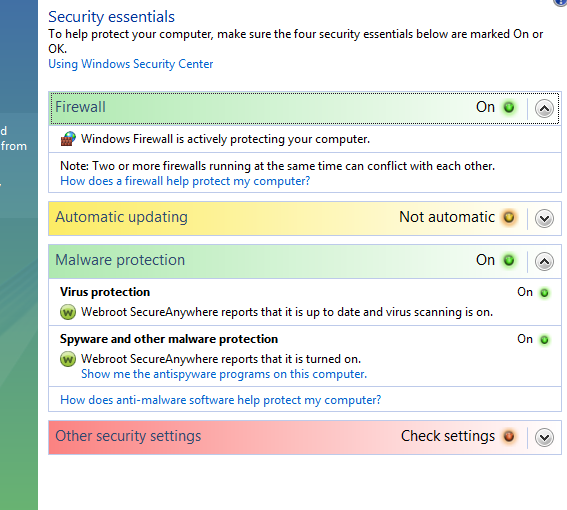
It shows in Vista 32bit.
 
Daniel 


RetiredTripleHelix
Gold VIP
Forum|alt.badge.img+56

garlicwebroot
Popular Voice
  • Author
  • Popular Voice
  • September 30, 2014
thank you for the info. So the consensus is that it shows in vista, and win 8 but never shows in win 7?

RetiredTripleHelix
Gold VIP
Forum|alt.badge.img+56
@ wrote:
thank you for the info. So the consensus is that it shows in vista, and win 8 but never shows in win 7?
That would be my assumption as I did a search and didn't see any: Windows 7 Action Center
 
Cheers,
 
Daniel ;)
 
http://tweakhound.com/windows7/tweaking/action1.gif