Webroot isn't allowing forms and pages to come in, even though they are safe.

  • October 3, 2014
  • 10 replies
  • 56 views

It doesn't even ask if I want to allow them.  How do I correct this?

10 replies

Ssherjj
Moderator
Forum|alt.badge.img+62
  • Moderator
  • October 3, 2014
@ wrote:
It doesn't even ask if I want to allow them.  How do I correct this?

Hello Evil,
 
Welcome to the Community Forum,
 
To be honest I'm not sure if this is Webroots doing.What browser are you using may I ask?
Have you checked your browser settings to allow autofill? Please check these setting first and get back to us and we can assist you further!
 
If Webroot is indeed blocking these sights then you can issue a Support Ticket free of charge..and they can whitelist this as well. You can also go to BrightCloud and enter the URL there. Here's more information here http://www.brightcloud.com/ and here http://www.brightcloud.com/services/file-reputation.php
 
Best Regards,

  • Author
  • Fresh Face
  • October 3, 2014
Win7 ie9 (just downloaded it last night)
 
To be honest, I'm not sure how to chance the autofill setting.  if it helps any, I'm trying to apply for a job, and it won't even let me sign up with the service.

Ssherjj
Moderator
Forum|alt.badge.img+62
  • Moderator
  • October 3, 2014
@ wrote:
Win7 ie9 (just downloaded it last night)
 
To be honest, I'm not sure how to chance the autofill setting.  if it helps any, I'm trying to apply for a job, and it won't even let me sign up with the service.
Hi evil,
 
Would you go to this Microsoft Website and follow these instructions andf then get back to us whether this was helpful or not and we will provide you with more help. also you can
Request a change here
http://brightcloud.com/support/repchangerequest.php
 
 
Thanks,

  • Author
  • Fresh Face
  • October 9, 2014
Sorry this took so song, but I had to go out of town and just got back to the laptop.  I don't think that site would be of any use since I'm not tryng to use autofill.

Ssherjj
Moderator
Forum|alt.badge.img+62
  • Moderator
  • October 9, 2014
@ wrote:
Sorry this took so song, but I had to go out of town and just got back to the laptop.  I don't think that site would be of any use since I'm not tryng to use autofill.
Hi Evil,
 
Sorry I couldn't be of any help...you can issue a Support Ticket free of charge.
 
Maybe @ can assist here..Are you available Daniel?;)

RetiredTripleHelix
Gold VIP
Forum|alt.badge.img+56
Hello and Welcome to the Webroot Community!
 
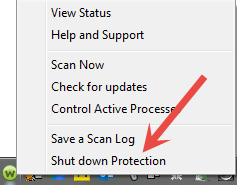
Can you turn off WSA to see if it is causing the issue? Right Click on the Webroot Tray Icon by the Clock and Click on Shut down Protection! And then try again and let us know!
 
Thanks,
 
Daniel ;)


Dermot7
Gold VIP
Forum|alt.badge.img+3
  • Gold VIP
  • October 9, 2014
Just to say that I do feel that the URL referred to is of relevance, and worth checking with IP/URL Lookup: Webroot  to ascertain its status, regardless of autofill etc. as was part of @'s original advice.
 

  • Author
  • Fresh Face
  • October 15, 2014
I really don't want to totally shut down the only security I have...Any other sugestions?

shorTcircuiT
Gold VIP
  • Gold VIP
  • October 15, 2014
Well, you would not leave it off.  Just turn it off long enough to refresh a page, to see if the form loads correclty, and then turn it back on.  
 
That will show us if Webroot is the cause, or if we need to look elsewhere for the culprit.

shorTcircuiT
Gold VIP
  • Gold VIP
  • October 15, 2014
Other than that quick test noted above, my next suggestion would be to uninstall the brower, reboot, and reinstall the browser.  Make sure to backup your bookmarks first if you want to keep them.