




OpenText Core Endpoint Backup v11.5
What is being released?
OpenText Core Endpoint Backup Vault and Client version 11.5.0
New Features/Enhancements:
- Client Upgrade Recommended Indicator
- Public REST APIs continued
- Reporting Enhancements
Customer use cases:
In Release v11.5, a new icon now appears next to the Backup Health status for devices whose client software version falls below the minimum standard required for optimal performance and security. This proactively alerts administrators when specific device clients require updates, enabling timely action to maintain optimal backup health, security, and compatibility in accordance with established standards.
Additionally, we have expanded our existing public REST APIs to provide more programmatic control over everyday administrative tasks, such as device reset and user management.
Lastly, the downloadable device report has been modified for clarity and focus, making it easier for administrators to identify and report on devices requiring client upgrades based on the current minimum version requirements.
Customer Benefits:
The new and updated REST APIs capabilities offer the following benefits for integration:
- Device Reset API: This API enables automation of device lifecycle management, significantly reducing manual effort for large-scale deployments or regular maintenance.
- Delete User API: Automate user offboarding processes, ensuring timely removal of access and supporting compliance requirements.
- List Companies API: Facilitates targeted integration and automation. Use this API to: Build custom dashboards or reports specific to a partner's managed companies. Integrate company lists into partner-specific portals or management tools.
- Forgot Password API: Integrate the password reset functionality directly into your own custom applications, portals, or support tools.
- Delete Partner API: Automate the partner offboarding process for increased administrative efficiency, support compliance requirements when partnerships conclude, and help maintain the accuracy and integrity of the active partner records within the platform through timely deletions.
Proactive Endpoint Health Monitoring: The new client upgrade recommendation indicator provides administrators with a real-time visual alert when any device’s backup client is running a version below the recommended one. This proactive stance on endpoint health and security helps ensure all endpoints stay up-to-date and protected.

Carbonite Safe Server Backup (CSSB) 6.8.4
What is being released?
Carbonite Safe Server Backup (CSSB) 6.8.4 is the latest release of the server backup product for very small businesses (VSBs). This release focused on fixing security issues and general optimizations:
- Fixed an issue where incremental and differential backups fail with the “Operation failed unexpectedly” message
- Updated bioNTdrv.sys (used for bare metal backups & restores) to version 2.0.0
- Removed GPT auto-conversion during bare metal recovery for certain Windows versions
- Fixed other minor defects & made general optimizations
- Improved security posture by addressing several security defects

MailStore Cloud 25.3
What is being released?
We are excited to announce the successful release of MailStore Cloud 25.3.
Key features and enhancements:
- Setup Wizards for Microsoft 365 and generic email servers (IMAP)
- Shared Mailboxes and M365 Group Mailboxes
- Bulk imports of EML files
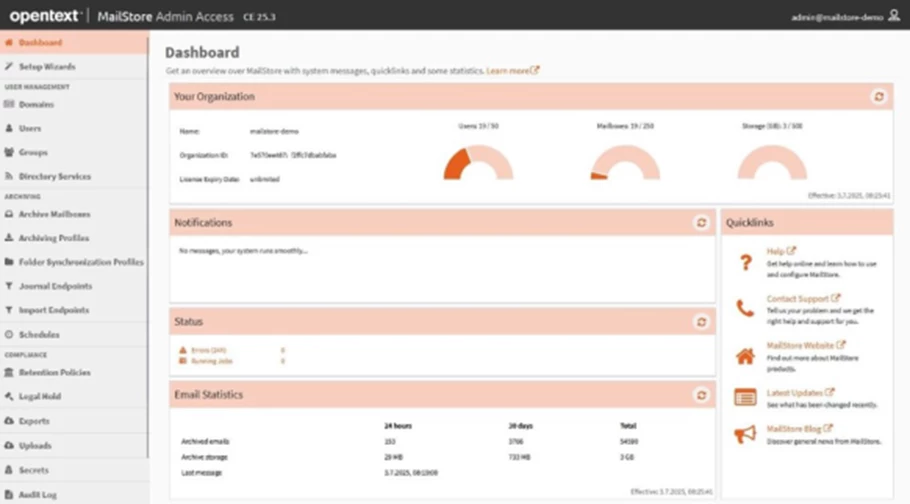
- Enhanced Dashboard
- Sync username changes with M365
- Several minor improvements (e.g. audit log search, clickable IDs, flagged emails, etc.)
Customer Benefits:
It has never been easier to set up archiving with MailStore. This release is a major enhancement of the user experience, especially for Microsoft 365 users.
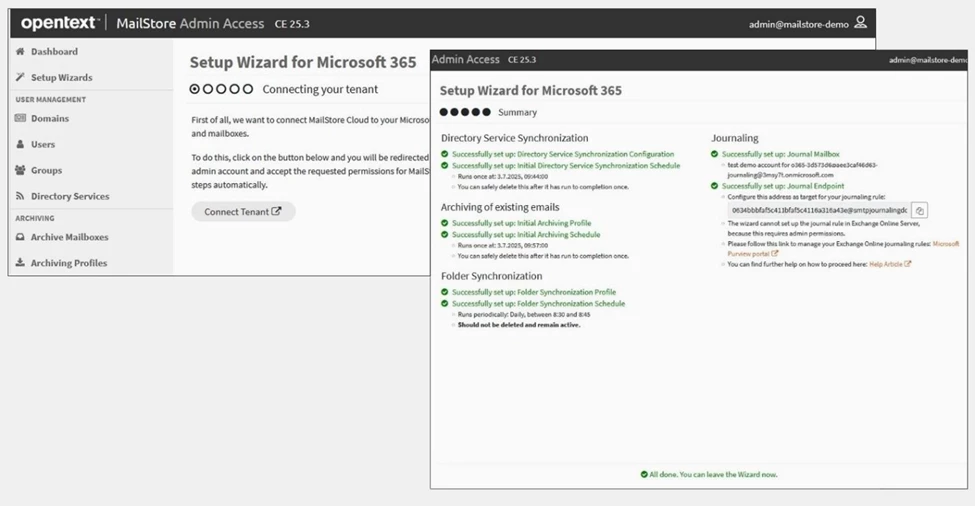
Setup Wizards for Microsoft 365 and IMAP
The new Setup Wizards make it very easy and comfortable for administrators to set up and integrate MailStore Cloud with Microsoft 365 and with other email services and servers. With just a few mouse clicks you and with your admin consent, the new M365 wizard will make all relevant settings in MailStore Cloud and in Microsoft 365 on your behalf. For other email systems, the Setup Wizard for IMAP will guide you through the setup steps and checks the connection for you. Setting up archiving and synchronising your users, groups, and mailboxes becomes a breeze.
Microsoft 365 Group Mailboxes and Shared Mailboxes
Group mailboxes and shared mailboxes in Microsoft 365 can now be synchronized with your Microsoft 365 tenant automatically. Group members will have immediate access to their archive mailboxes in MailStore Cloud.
Synchronization of username changes in Microsoft 365
Any username changes in M365 are now automatically tracked and synchronized. This means that no manual adjustments need to be made in MailStore Cloud when the usernames change in M365.
Bulk Imports of Emails
The new bulk import feature facilitates imports from other archiving solutions and other email repositories, making transitions smoother and more efficient.
Large volumes of emails, such as entire mailboxes, can be uploaded and imported to MailStore Cloud as zipped EML files, while preserving the folder structure of the original mailbox.
Enhanced Dashboard
The enhanced administrator dashboard provides all relevant information of your MailStore Cloud organization on one screen, such as license details, usage and email statistics, admin notifications and status information.

DNS Protection Agent 4.4.3
What is being released?
DNS Protection Agent 4.4.3
The DNS Protection agent has been rebranded from Webroot DNS Protection -> OpenText Core DNS Protection. The installer, program, and registry product name will now be labelled according to our unified go-to-market strategy.
We’ve also fixed issues seen in the field where devices recovering from sleep/standby mode were unable to access internal domains.

Webroot Security for Chromebook App V2.1.0
What is being released?
We are very pleased to announce the release of the Webroot Security for Chromebook V2.1.0 App in the Playstore. The updated app is available in the Playstore: https://play.google.com/store/apps/details?id=com.webroot.chromebook
New Features
- What’s new – The app has been updated with the latest SDK to support Google compliance policy
- Added the Android features which were released in last one year
- Profile page
- Opentext Cookies
- Dark mode support

OpenText Unity - Thrust API CE 25.2.1
What is being released?
We are pleased to announce the release of OpenText Unity - Thrust API CE 25.2.1
This is a minor update applying the OpenText rebranding styling and Accessibility improvements to the API reference documentation, along with various minor bug fixes.
New Features and Enhancements
- New OT branded theme for online documentation.
- Numerous Accessibility improvements in accordance with VPAT 2.5 International.
- VaultId mappings expanded for the POST /service/api/ecom/shop/carts endpoint.
The online Unity API documentation is fully updated to reflect these changes.
This can be found at : Unity - Thrust API CE 25.2.1 Documentation

Webroot Total Protection - Mac 1.2.0
What is being released?
We are very pleased to announce the release of the Webroot Total Protection – Mac Version 1.2.0.
What’s new – This release supports Webroot Total Protection and Webroot Total Protection Family plans. This was a significant release from the Webroot Total Protection Mac perspective, as users can now perform a Full scan, manage the RTS, and no longer need to enter the keycode manually.
New Features
- Embedded Keycode: Allows the users to install and set up the application without manually entering the keycode. The keycode will be embedded within the application.
- Full Scan: Now users can start the complete full Scan from the application based on need.
- RTS: Users can enable/disable the RTS to start or stop Real Time Protection
- Expired: If the Keycode is expired then the application will move to the expired state, and it will not work until the user enters a new valid keycode.

Cloud-to-Cloud Backup CE 25.2.1
What is being released?
- REST API Access for Indirect Partners/Customers
Distributors and resellers - your customers/partners (our indirect customers and partners) can now directly generate REST API tokens from Cloud-to-Cloud Backup UI - no support ticket required.
Get hassle-free REST API access for seamless integration. Rest assured, we've blocked all billing-related endpoints by default for added privacy.
Note: OpenText partners not using our Partner Portal need to contact support for API token generation. - Simplify Onboarding for New Distributors’ Partners
Distributors can reduce onboarding time for new partners by sending them a welcome email. Choose to send it via Partner Portal or REST API v2.
This email includes helpful information for quick onboarding, such as:- Login and password setup instructions.
- How-to for account setup and customer onboarding.
- Helpful support and documentation links.
- Self-service Backup Radar Setup with Report Type Selection
Integrate and harness Backup Radar's capabilities with a few clicks directly via the Partner Portal (without waiting on support). Moreover, you can also self-select your preferred reporting style: task-level or item-level.
For MSPs without Partner Portal access, report configuration remains available via support.- Task-level reports summarise the backup task status
- Item-level reports provide detailed reporting for each backed-up item.

OpenText Universal Reporter
What is being released?
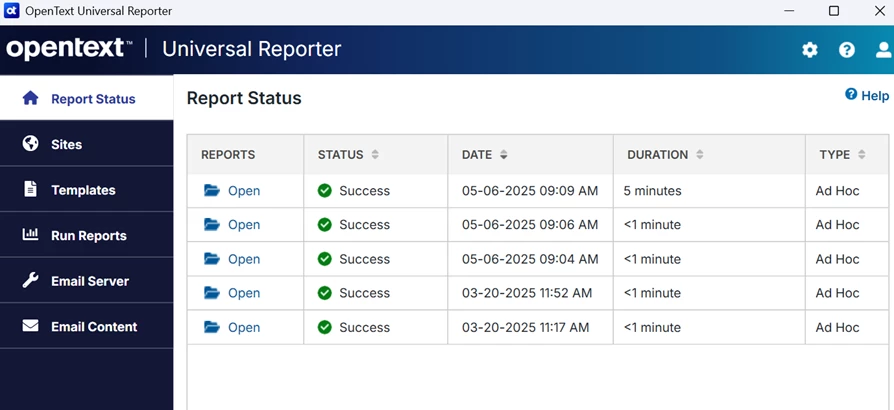
We’re pleased to announce the release of the updated OpenText Universal Reporter, now redesigned to align with OpenText’s enterprise standards.
This version introduces comprehensive KIS-compliant rebranding and significant accessibility enhancements by WCAG 2.1 AA guidelines.
Enhancements
- OpenText Branding Update
- Updated splash screen, icons, and UI visuals based on OpenText KIS standards
-
- Product installer updated to reflect new identity
- Accessibility Compliance Improvements
- Improved keyboard navigation
-
- Screen reader compatibility across all critical workflows
-
- Fixed contrast issues and added tooltips where needed

Webroot Mobile Security V 8.1.1 Android App
What is being released?
We are pleased to announce the release of the Webroot Mobile Security V 8.1.1 Android App in the Playstore. The updated app is available in the Playstore: https://play.google.com/store/apps/details?id=com.webroot.wms
New Features
SMS Scam Protection: SMS-based phishing (commonly known as Smishing) and SMS spoofing are among the most prevalent mobile attack vectors, accounting for over 30% of mobile threats — a figure that continues to rise.
We are introducing Webroot SMS Scam Protection, a security feature designed to detect and alert users to fraudulent text messages and malicious links in real time.
- ML-Based Detection: Automatically scans incoming SMS messages for malicious URLs using the BrightCloud threat intelligence system.
- Real-Time Alerts: Users receive immediate notifications when a potentially harmful message is detected, enabling proactive protection.

OpenText Core Security Awareness Training
Sales Position & Related Features:
The June SAT Content Library release provides high-quality content for our customers focused on risks originating from social media platforms. Our content updates address these specific security issues:
- Understanding how attackers can use social media information for targeting
- Managing privacy settings across different platforms
- Recognising phishing attempts via social media
- Protecting sensitive company information in posts
- Building awareness of social engineering tactics
Additionally, courses for two new languages from Skillsoft: British English and Latin American Spanish
Note, the OpenText Core branding is implemented in system templates across all content types.
Release details are available directly to customers in the app.
What is being released?
- Rebranded OpenText Core system templates
- New language content from Skillsoft: Latin American Spanish and British English
- Autopilot training and phishing campaigns for the baseline track
- 19 new thematic content templates (email, lure and infographics) for use in US region learning campaigns and phishing simulations
- Two new monthly learning modules from NINJIO

OpenText EDR Now Available in Secure Cloud
What is being released?
On the heels of the distinguished OpenText Endpoint Detection and Response (EDR) product launch, we are excited to announce the successful release of EDR to Secure Cloud Managed Service Providers (MSPs).
Release Highlights
Secure Cloud MSP Purchase Journey
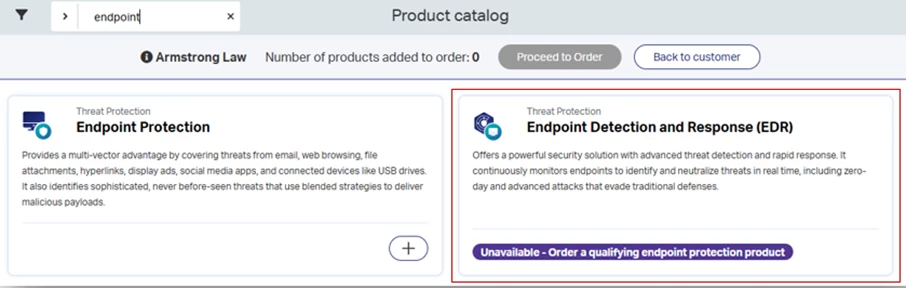
EDR is available as an add-on offering for Webroot Endpoint Protection in the MSP product catalog. MSPs can purchase Endpoint Protection and EDR at the same time or purchase EDR after Endpoint Protection is deployed:
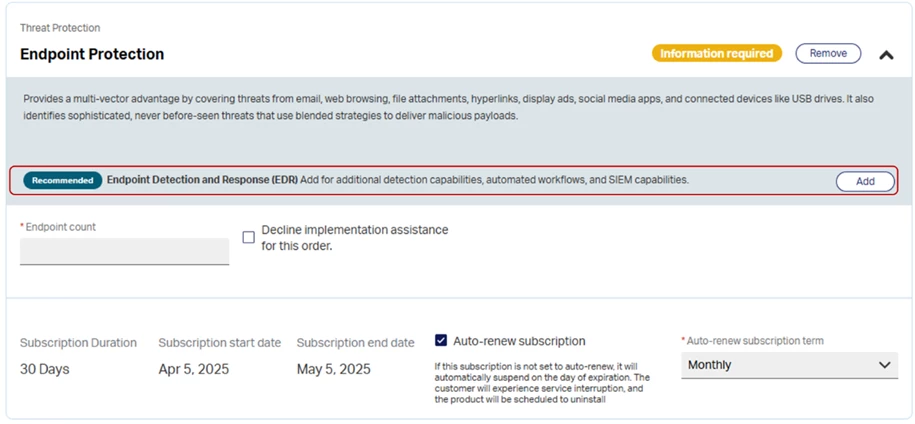
When Endpoint Protection is purchased standalone, EDR is recommended to promote the additional detection, automated workflows, and SIEM capabilities:
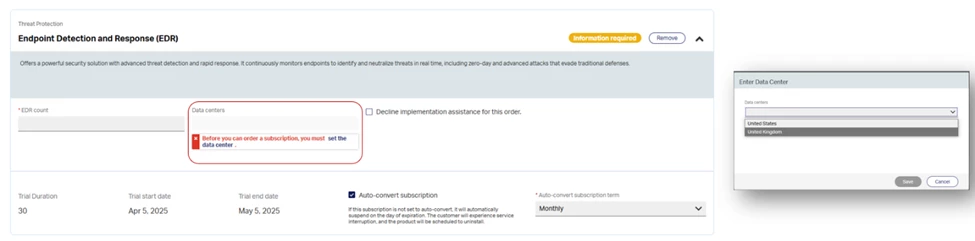
Net new EDR MSPs will be prompted to designate a data centre (UK or US) when placing their very first EDR order. The initial selection is maintained at a partner level and inherited to all subsequent EDR orders:
Service Management Experience
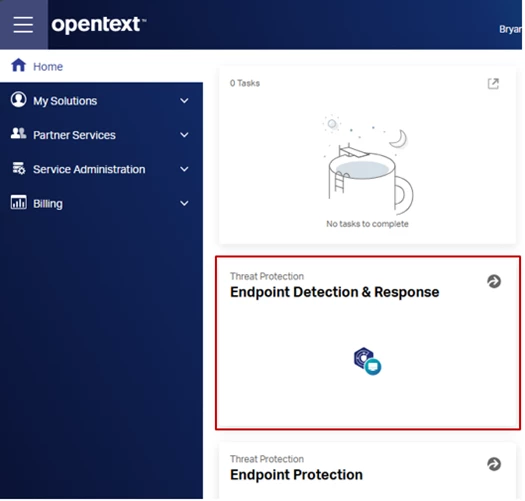
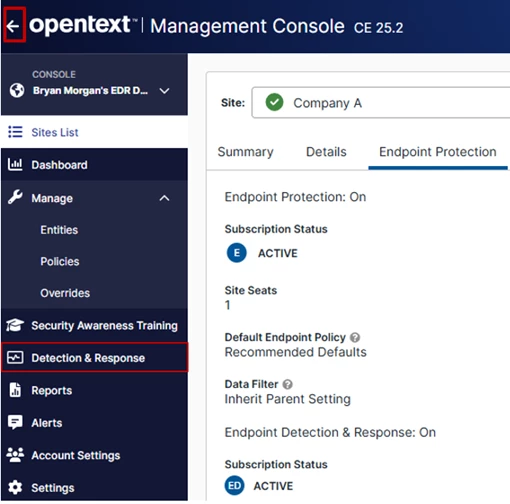
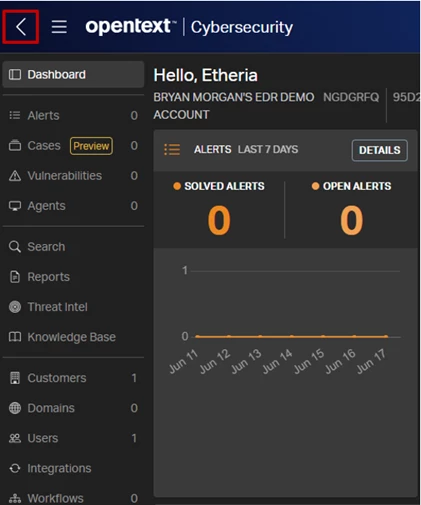
MSPs can initiate single sign-on from Secure Cloud to Webroot GSM to manage policies and access the agent. To configure workflows and integrations, a convenient Detection & Response link is available to access the Detection & Response platform. The top-left navigation element enables navigation between consoles to return to Secure Cloud.
Reminder - Managed Detection and Response (MDR) in Secure Cloud
For the initial Secure Cloud release, MSPs will be limited to purchase either EDR or MDR - not both. This is a temporary constraint until Secure Cloud migrates from the current Pillr MDR experience to the new OpenText MDR experience in GSM that renders a combined EDR + MDR agent. There is messaging throughout the purchasing journey to alert partners. While this constraint is in place, this also means that Compliance Storage, Chromebook, and Mobile add-ons are only available to purchase with MDR when purchasing through Secure Cloud.





