

Webroot is taking too much time if its included in services to start when computer boots up. It causes bootup to delay by 2 min 20 s which I want to avoid.
I would like to make Webroot start in a delayed manner so it starts as soon as the computer is done with booting up process. Can I do this?
Answer
Can I delay Webroot so it doesn't run at boot time but immediately after booting is complete?
Best answer by shorTcircuiT
Hello sun21170, welcome to the Webroot Community!
It sounds like you have WSA set to scan at boot time... and that is easy to change.
Open WSA
Click the Advanced Settings button at the upper right
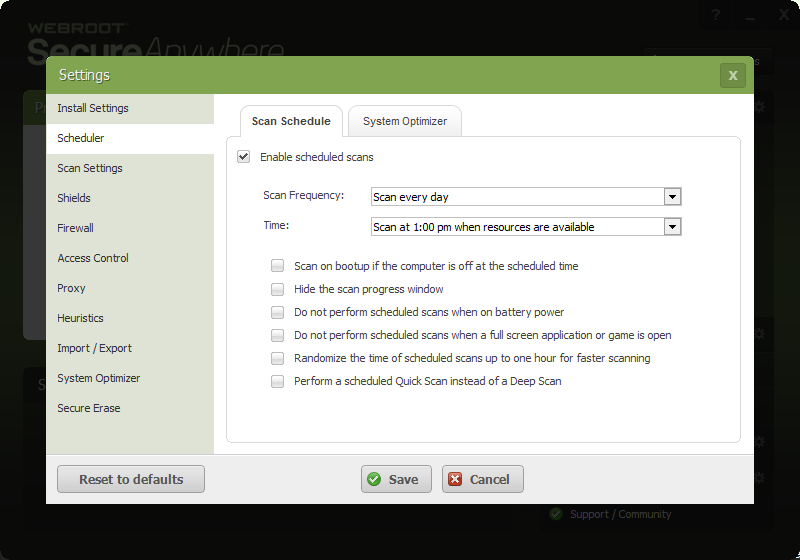
Click on Scheduler
REMOVE the check mark next to "Scan on Bootup if the computer is off at the scheduled time"
Review your schdule time, and either disable Scheduler or change the time for a time when the computer will be on, but the scan won't interfere with your usage. (My own is set for 7 PM. While I am usually using the computer at that time, that is OK as the scan is so fast it does not interfere anyway.)
I hope this helps!
It sounds like you have WSA set to scan at boot time... and that is easy to change.
Open WSA
Click the Advanced Settings button at the upper right
Click on Scheduler
REMOVE the check mark next to "Scan on Bootup if the computer is off at the scheduled time"
Review your schdule time, and either disable Scheduler or change the time for a time when the computer will be on, but the scan won't interfere with your usage. (My own is set for 7 PM. While I am usually using the computer at that time, that is OK as the scan is so fast it does not interfere anyway.)
I hope this helps!





Login to the community
No account yet? Create an account
Enter your E-mail address. We'll send you an e-mail with instructions to reset your password.