
Answer
Cannot paste from clipboard in certain programmes - have to switch webroot off!


Am using a text/HTML editor in a web design programme
Best answer by Baldrick
Hi Relvin
Welcome to the Community Forums.
The problem is most likely that WSA is blcokiing this whilst trying to protect your identity.
You need to check for this as follows:
Click on the gear/cog symbol to the right of the Identity Protection tab
and then on the Apllication Protection tab to reveal the application statuses (shown in the red boxed area.
The meaning of the three status are explained below:
2. Identity & Privacy > Protected Applications
This setting will only appear for users of the Essentials or Complete versions of Webroot SecureAnywhere. The basic Antivirus version does not contain this feature.
- "Allowed applications" are not secured against information-stealing malware, and also have full access to protected data on the system. Many applications unintentionally access protected screen contents or keyboard data without malicious intent when running in the background. If you trust an application that is currently marked as "Deny," you can change it to "Allow."
- "Protected applications" are secured against information-stealing malware, but also have full access to data on the system. By default, web browsers are assigned to the "protected" status. If desired, you might also want to add other software applications to "protected," such as financial management software. When you run a protected application, the Webroot icon in the system tray displays a padlock.
- "Denied applications" cannot view or capture protected data on the system, but can otherwise run normally.
You then need to find the application that yo are using to copy & paste, in the list of apps on the left and check what the status is, and adjust it in line with the above.
Hopefully that will sort your issue out.
If not then please come back and let us know...and we will take another look for you.
Regards, Baldrick
Welcome to the Community Forums.
The problem is most likely that WSA is blcokiing this whilst trying to protect your identity.
You need to check for this as follows:
Click on the gear/cog symbol to the right of the Identity Protection tab
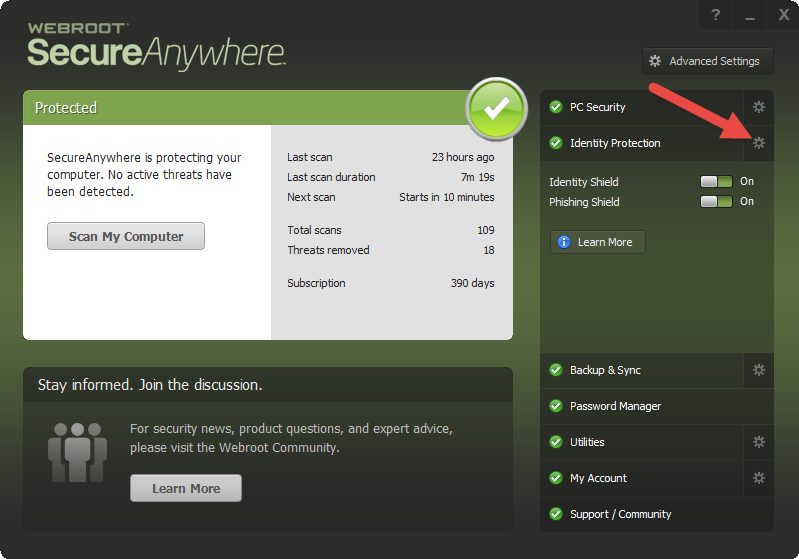
and then on the Apllication Protection tab to reveal the application statuses (shown in the red boxed area.
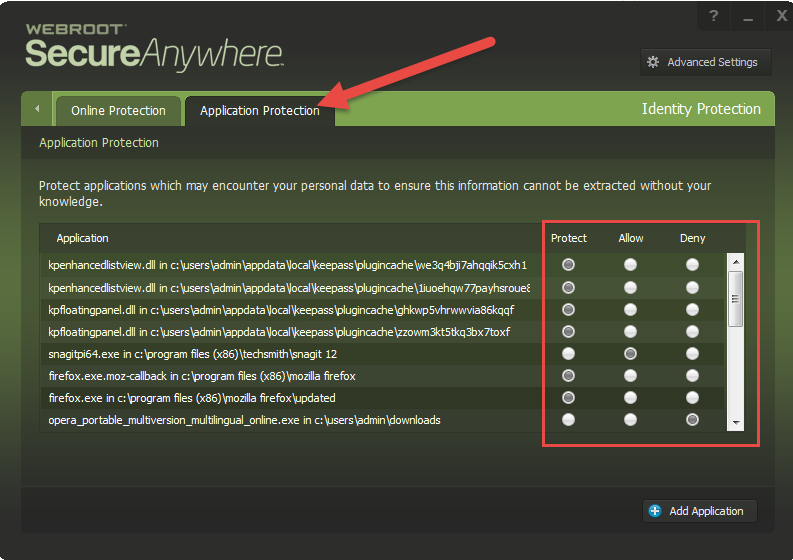
The meaning of the three status are explained below:
2. Identity & Privacy > Protected Applications
This setting will only appear for users of the Essentials or Complete versions of Webroot SecureAnywhere. The basic Antivirus version does not contain this feature.
- "Allowed applications" are not secured against information-stealing malware, and also have full access to protected data on the system. Many applications unintentionally access protected screen contents or keyboard data without malicious intent when running in the background. If you trust an application that is currently marked as "Deny," you can change it to "Allow."
- "Protected applications" are secured against information-stealing malware, but also have full access to data on the system. By default, web browsers are assigned to the "protected" status. If desired, you might also want to add other software applications to "protected," such as financial management software. When you run a protected application, the Webroot icon in the system tray displays a padlock.
- "Denied applications" cannot view or capture protected data on the system, but can otherwise run normally.
You then need to find the application that yo are using to copy & paste, in the list of apps on the left and check what the status is, and adjust it in line with the above.
Hopefully that will sort your issue out.
If not then please come back and let us know...and we will take another look for you.
Regards, Baldrick



Login to the community
No account yet? Create an account
Enter your E-mail address. We'll send you an e-mail with instructions to reset your password.